Agent Cloud
Turning data questions into data infra with Cloudflare Basin

Micah Wylde
Cloudflare
0:03My name is Laura. I'm a software engineer at Block. If you haven't heard of Block or you're not familiar with it, you might be more familiar with some of our business units, Span, Square, Cash App, Afterpay, BitKey, Title, to name most of them. We don't have that many more business units. Today I'm going to be talking about how we manage many different workers. This is going to be a pretty CICD heavy talk. So hopefully it can relate to some of the experience that you guys had had as well.
0:41Okay, I'm going to start by talking about who we are as a team. I think this is probably going to resonate with a lot of people in this room. But ultimately, we are about four engineers at Block that manage a very large CDN. footprint um for Cloudflare specifically we have about 20 accounts and at this point 250 plus zones we seem to create a new zone every day so that number is always increasing and the way that we've set up our Cloudflare footprint is we basically have by default one worker per zone so that means that we have hundreds of workers that we're managing and across four people, that's a lot to have to manage. So we've adopted the goal where we're not trying to be the ones gatekeeping all the logic to our workers.
1:32We really aim to develop the tooling, the guardrails and expertise to allow application teams to come use our tooling in a way that enables them to self -serve and really own the context of their edge presence. including their workers so I'm going to talk a little bit about where we started from a tooling perspective when I joined the team what some of the struggles were with that tooling and how we've evolved that over time and tried to solve some of those problems what we built has ended up being pretty opinionated to how we configure our Cloudflare footprint but hopefully it is also something that you know can inspire the people in this room to follow some of the practices that we've adopted as well.
2:23So when I joined the team, we had a single Terraform monorepo where we had all of our Cloudflare config. I'm sure many of you use Terraform in much the same way, but we also had all of our workers in the same Terraform repo. This was the days before the Cloudflare v5 Terraform provider, which has made managing workers way... better than it was in the past, but the experience of managing workers in a Terraform repo at this time was not a good user experience. Whenever you modified any worker code, you basically had to compile that, and then the output that was generated is what your Terraform would key off of for how to release changes to your worker. So if you made changes to, you know, a TypeScript file, but you didn't do that compilation step, and you tried to merge your PR, you didn't actually release any.
3:16changes. So there was always a lot of developer friction that was introduced in that process. But at the bottom of the slide, there were some redeeming qualities to this approach that we always wanted to maintain in what we built going forward. And that was basically that the repo was still self -serve. So application engineers could come into this and make changes on their own. You could make a very targeted change. You could modify just a single worker and deploy only that. So, you know, focusing the thing that you had context or ownership of and not needing to change anything else even though you know everything was managed in the same repo and then we had a pretty basic notification system so when changes actually did go out making sure people who might have been unfamiliar with the code base but were at least getting pinged on how to actually facilitate the release pipeline for the worker at that point now our biggest pain points with this approach, aside from just general usability friction, reliability was definitely the biggest issue that we had.
4:19With this Terraform provider at the time, there was no way to release changes to workers gradually. So you can imagine that is a huge risk that we had. Workers sit kind of in the middle of your request flow, and we had so, so much traffic that would go through some of our key workers. and then that would ultimately get sent out to all kinds of applications, you know, behind our origin. So if you introduced a bug into one of these key workers that broke the worker, you're basically introducing an incident that took down a huge amount of critical traffic. Another issue that we had was around security authorization mainly. We basically, once a PR had been merged, we had an explicit approval step for then releasing that worker.
5:08into the wild, but we had a single group of people who were eligible to click that button to advance a worker. So you might have been making a change to a worker, but then somebody without any actual context for your worker was still able to approve that worker into production, which we never had anybody really misused that, but from a zero trust kind of perspective, it's not a good practice to have. And then lastly, and I'll talk a little bit more about this in a moment, the way that code was shared among workers was not good. And again, I'll get into that in a second. So what we ended up building was really a new monorepo where we just extracted all of the worker config that used to live in this Terraform repo into a new repo that is now primarily TypeScript focused, but then we have a ton of additional magic on top that really is the brains behind our CICD workflows that makes management of workers at this scale much easier.
6:11So at Block, we use Buildkite for managing our pipelines. Buildkite kind of natively interacts with Bash really nicely, but I don't know about you, I don't love reading or writing Bash. This was also mainly built in the time pre-agents. Agents don't care about writing Bash. We didn't like that. so we built a lot more of the pipeline logic in Golang so primarily TypeScript in terms of like worker code but then really so much of what powers this monorepo is the secret sauce of our pipeline logic so now I'm going to go through basically different facets of this monorepo and you just dive a little bit more into those so I talked about the shared dependencies basically functions that all of our workers end up calling and we had a lot of friction with the original approach in all of our workers effectively reference these functions by just with you know local imports like we had at the top here so we would have a problem where somebody could come into the repo make a change to one of these shared functions and then compile say a small subset of workers and then to release just those workers, right?
7:33But you can imagine all of the other workers in the repo that are referencing these same functions, they're not getting updated. As this happens time and time again, you basically lose track of what version of the shared code functions all of these other workers are referencing. And so we have no way of really putting that together. You'd have to do some sort of mental gymnastics to really understand that. In our new- repo we took a very basic solution to this where all of the shared code functions are now just their own node packages so we basically have a directory in this monorepo for all of these different packages that get shared across our workers and our ci is smart enough to identify when you know changes to just those packages are happening you can make those changes get those pr reviewed merge those and then that's the process is going to be uh you know versioning those releasing those and pushing them to an internal artifactory repository that we have and then it's a separate step to go back into a worker and update the version of the package that you just changed like you would any other dependency right it's just a node package version bump um so that was a very vanilla approach to that we weren't trying to complicate that anymore but it was a problem that we solved with our new repo Next up, I'll talk a little bit about the tools and templates directories that exist in this monorepo.
9:01The tools, this is basically where Golang comes into the mix. It is ultimately a Golang CLI. It has pretty basic functionality. The two main families of commands are these like bootstrap and pipeline commands. Bootstrap is for spinning up new resources in the worker in this region. very easily. So we basically are talking about two different types of resources. We're talking about a new worker or we're talking about you want to create a new shared package. Um, the bootstrap command is going to be using templates. Templates are a directory of, um, the skeleton of code for creating a new worker or a shared package. Um, so very basic there. It's just using GoLang's like templating.
9:50package itself and then injecting some interpolating some information into that and spinning up your new resource very easily and then the pipeline commands this is what our build kite pipelines are ultimately referencing um and powering all the logic that our pipelines are running okay so what do what do workers actually look like in this repo well if you've ever used a worker before it should look very similar to what you would get if you use Cloudflare C3 CLI to just bootstrap your own worker. Like that's what we're running under the hood. But our bootstrap command just adds a little bit of secret sauce on top of that. Every worker that we create by default has some boilerplate that gets injected into it.
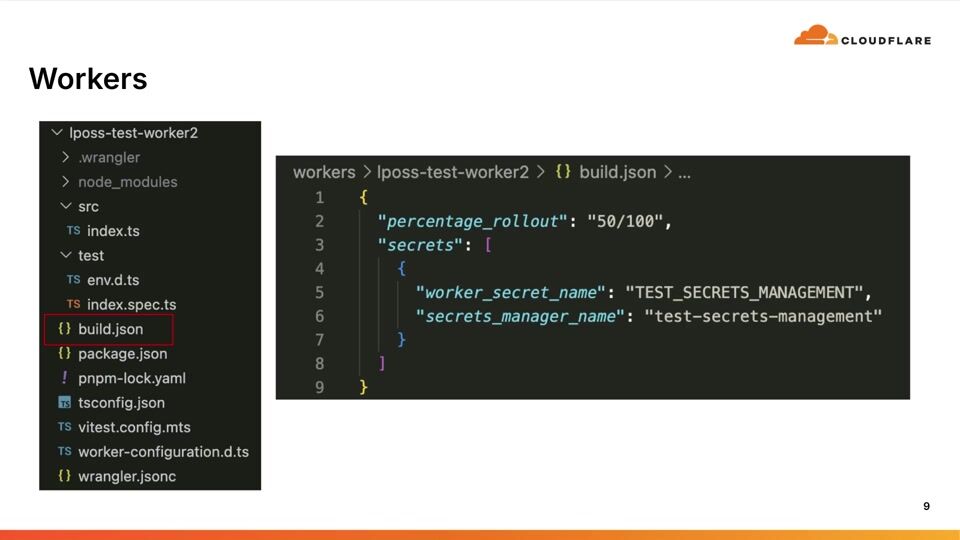
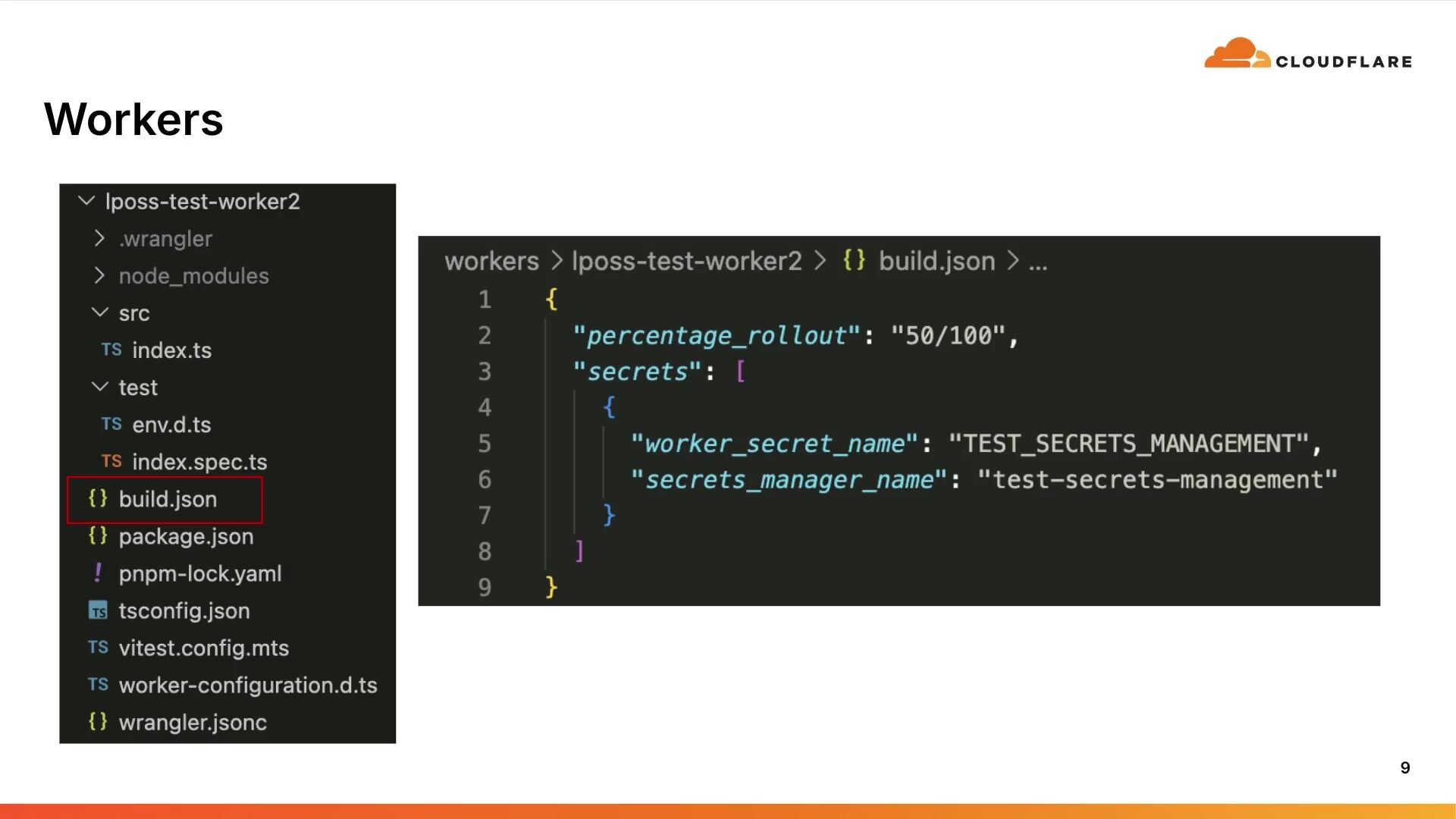
10:35Again, that's defined based on what is in that template directory. And then the other thing that we added is this special config file. this build .json file, and this is just additional configuration that powers our pipelines. It's not really doing all that much right now, like this is kind of the most complicated build .json file you would see for a particular worker, but it controls this percentage rollout pattern that we have where this can be really any pattern that controls how gradually you're working. worker gets deployed when you make changes to worker logic. And then below this, there's the secret. I'll get into the secrets in a second and how we manage those a little bit more.
11:24Okay, so diving a little bit more into the pipelines themselves. We basically have three build kite pipelines. One runs whenever you open up a new PR or push changes to that additional PR. One runs when you merge a PR and then we have a separate pipeline for worker releases. So, excuse me, whenever you change logic in a worker that gets deployed through the worker deploy pipeline, a PR, in PR, you can modify as many workers as you want at a time. Those will queue off individual worker deploy pipelines, and those are going to run in parallel. So, you know, if you change worker A and B in the same pipeline, you get two worker deploy pipelines. And those function independently.
12:11So if worker A fails to deploy for whatever reason, worker B will be unaffected by that.
12:19Ultimately, it's pretty limited in the terms of things that this repo will support in facility, like the changes that you can actually make when you are merging PRs. So this top picture here is meant to highlight kind of those four things that are... is always looking for the types of changes that it supports. One is worker deletions, whether you're trying to deploy a worker, whether you want to publish a new package, or whether you want to change the secrets associated with a worker. So depending on, you know, you've merged your PR, depending on the types of changes that you're making, CI will flag one of these four types of things. I know there's five things here, but we'll get into worker deletions and how we support moment.
13:06But depending on the types of changes that you're making will influence what the pipeline logic is actually running at the time, right? So let's dive a little bit more into what our pipeline for worker deploy is actually looks like. It's governed by this state machine that you see here. Looks a little complicated. It's not all that crazy. We're going to walk through it real fast. The first thing that happens when we deploy a worker is we to see have we ever deployed this worker before if we have not then it's not possible to do a gradual release right there's no other version to kind of compare it against so we just do ultimately the pipeline is executing a regular deploy command right you do that one and done and that gets shipped assuming that you have deployed this worker before the next thing we do is a check to make sure that there is no ongoing deployment already happening for this worker if there is the pipeline just fails and we give precedence to any ongoing deployments that are already happening.
14:08Assuming there is no ongoing deployment, then we start using the Wrangler version commands of the Wrangler CLI, right? And so that's gonna walk through the gradual deploy, the gradual release of your worker, and that's gonna be influenced by that pattern that was set in the worker's build.json file. The nice thing about this is that as each gradation of that pattern gets released you have to do a manual approval step to advance to that next value. So the idea here is that whoever merged the worker change should be you know keeping an eye to make sure that as this release is happening metrics look good you don't see any error rate increases or anything like that. If you do this picture on the top right here this is the actual model that you see in Buildkite.
14:58So you're either approving it, and if you are seeing issues, you can reject and roll back to the original version right in the pipeline itself.
15:10Okay, a little bit on how we manage secrets for our workers. So again, this is defined, like the source of truth is this build.json file.
15:20There's logic in our pipeline. It's trying to reconcile what it sees in that build.json file. what Wrangular is reporting as the status for what secrets it sees for that worker. So you can imagine, you know, we want to add secret two to this example worker. So the pipeline through git diff, when it's determining what is actually happening in this chain set that you have, it sees, okay, it's added secret two, it will ask Wrangular, what secrets do you actually have for this particular worker? Wrangular will say, I only have secret one. set for this worker that's enough for our build kite pipeline to know okay i actually need to execute a wrangler secrets command to add secret to and get it to the the point that the build .json file says should be for this worker um if you've used secrets with workers at all you know that it creates a new version of a worker when you update or set any new secrets for a worker so We do not allow people to combine secrets changes with logic changes at the same time because just the complications that you would get with how you would actually do rollbacks when you combine those two types of changes is kind of a mess.
16:36So to keep things simple, we have guardrails in place. So if the pipeline sees you're trying to change both secrets for a worker and logic for that same worker in the same PR, it's just going to not let you merge the PR and it will. It will add comments to the PR, like telling you, like you have to do these things separately.
16:57Okay, and then worker deletions. This is a two-step process, mainly just due to how the wrangler delete command works. It wants your workers wrangler.jsonc file to exist in order to like execute that command. So when we were originally building this, we thought, you know, we would basically basically key CI to look for people deleting a worker directory from the repo for CI to know to delete that worker. But then you're deleting all of the information that the Wrangler command actually wants in order to perform the deletion. So what we settled on was the removal of the build .json file to signal intent that you want to delete the worker. When CI sees the deletion of these build out json files it will then delete the worker for you and then it's basically a separate step where you have to make another pr to then clean up that worker repo um yeah so that's just highlighting the two different types of worker deletion steps that the pipeline uh is looking for okay um that was a speed run of what our monorepo does uh there are limitations to the system that we've built.
18:14And these are things that we have accepted. And again, like it's a very opinionated way of managing workers based on like how we structure our accounts and our zones and our environments across our Cloudflare footprint. But two of the biggest limitations with what we've built is first is the shared package version drift. So I kind of touched on this. This is an issue. had in the original implementation of How We Manage Workers that is still present today. But basically, people can go in and can update these shared packages and publish new versions And since updating workers is like a separate individual step to actually have a worker incorporate these updated packages, like if people aren't regularly deploying or updating the versions of the...
19:11packages that their workers are using then there's just going to be drift like people will continue to update these shared packages and if those workers aren't getting updated too then they're just going to be running old versions of that logic um and then the second limitation that we have is that like you saw we we only support a very small uh amount of the functionality that the wrangler cli actually offers and some of that is by design right like again we're putting guardrails in place it's limited controls for what these application teams can come in and actually do with our tooling but um sometimes we do have teams that come in and they're like hey we want to use say uh containers like do you have ci that can support that and with this current implementation of the repo like we don't have support for that today so then it becomes a conversation of like do we want to extend our repo to include support for these other features or you know, do we build something else to support them and their needs?
20:10So it's always interesting to see what people come and need our support for. Okay. Well, that is all. Thank you.
Micah Wylde
Cloudflare
Dillon Mulroy
Cloudflare
Tõnu Tammer
Estonian Railways
Be the first to know when registration opens and the agenda goes live.
---
title: "Cloudflare Workers monorepo"
url: "https://www.cloudflare.com/connect/2026/session/cloudflare-workers-monorepo"
year: 2026
---

# Cloudflare Workers monorepo

[Watch session](https://www.cloudflare.com/connect/2026/session/cloudflare-workers-monorepo)

## Session details

- **Track:** Network & Infrastructure
- **Topics:** Performance & resiliency, Cloudflare product innovations, AI transformation
- **Solution areas:** Developer Platform

## About this session

Most teams run a handful of Cloudflare Workers and deploy them with wrangler deploy. At Block, we manage 216+ Cloudflare Workers across multiple accounts and business units all from a single monorepo. This talk walks through the architecture, tooling, and organizational patterns that let a small platform team provide a consistent, self-service management experience for every Worker in the fleet, regardless of which team owns it.

## Speakers

- [Laura Poss](https://www.cloudflare.com/connect/speakers/2421410) — Software Engineer, Block, Inc.

## Transcript

[0:03] My name is Laura. I'm a software engineer at Block. If you haven't heard of Block or you're not familiar with it, you might be more familiar with some of our business units, Span, Square, Cash App, Afterpay, BitKey, Title, to name most of them. We don't have that many more business units. Today I'm going to be talking about how we manage many different workers. This is going to be a pretty CICD heavy talk. So hopefully it can relate to some of the experience that you guys had had as well.

[0:41] Okay, I'm going to start by talking about who we are as a team. I think this is probably going to resonate with a lot of people in this room. But ultimately, we are about four engineers at Block that manage a very large CDN. footprint um for Cloudflare specifically we have about 20 accounts and at this point 250 plus zones we seem to create a new zone every day so that number is always increasing and the way that we've set up our Cloudflare footprint is we basically have by default one worker per zone so that means that we have hundreds of workers that we're managing and across four people, that's a lot to have to manage. So we've adopted the goal where we're not trying to be the ones gatekeeping all the logic to our workers.

[1:32] We really aim to develop the tooling, the guardrails and expertise to allow application teams to come use our tooling in a way that enables them to self -serve and really own the context of their edge presence. including their workers so I'm going to talk a little bit about where we started from a tooling perspective when I joined the team what some of the struggles were with that tooling and how we've evolved that over time and tried to solve some of those problems what we built has ended up being pretty opinionated to how we configure our Cloudflare footprint but hopefully it is also something that you know can inspire the people in this room to follow some of the practices that we've adopted as well.

[2:23] So when I joined the team, we had a single Terraform monorepo where we had all of our Cloudflare config. I'm sure many of you use Terraform in much the same way, but we also had all of our workers in the same Terraform repo. This was the days before the Cloudflare v5 Terraform provider, which has made managing workers way... better than it was in the past, but the experience of managing workers in a Terraform repo at this time was not a good user experience. Whenever you modified any worker code, you basically had to compile that, and then the output that was generated is what your Terraform would key off of for how to release changes to your worker. So if you made changes to, you know, a TypeScript file, but you didn't do that compilation step, and you tried to merge your PR, you didn't actually release any.

[3:16] changes. So there was always a lot of developer friction that was introduced in that process. But at the bottom of the slide, there were some redeeming qualities to this approach that we always wanted to maintain in what we built going forward. And that was basically that the repo was still self -serve. So application engineers could come into this and make changes on their own. You could make a very targeted change. You could modify just a single worker and deploy only that. So, you know, focusing the thing that you had context or ownership of and not needing to change anything else even though you know everything was managed in the same repo and then we had a pretty basic notification system so when changes actually did go out making sure people who might have been unfamiliar with the code base but were at least getting pinged on how to actually facilitate the release pipeline for the worker at that point now our biggest pain points with this approach, aside from just general usability friction, reliability was definitely the biggest issue that we had.

[4:19] With this Terraform provider at the time, there was no way to release changes to workers gradually. So you can imagine that is a huge risk that we had. Workers sit kind of in the middle of your request flow, and we had so, so much traffic that would go through some of our key workers. and then that would ultimately get sent out to all kinds of applications, you know, behind our origin. So if you introduced a bug into one of these key workers that broke the worker, you're basically introducing an incident that took down a huge amount of critical traffic. Another issue that we had was around security authorization mainly. We basically, once a PR had been merged, we had an explicit approval step for then releasing that worker.

[5:08] into the wild, but we had a single group of people who were eligible to click that button to advance a worker. So you might have been making a change to a worker, but then somebody without any actual context for your worker was still able to approve that worker into production, which we never had anybody really misused that, but from a zero trust kind of perspective, it's not a good practice to have. And then lastly, and I'll talk a little bit more about this in a moment, the way that code was shared among workers was not good. And again, I'll get into that in a second. So what we ended up building was really a new monorepo where we just extracted all of the worker config that used to live in this Terraform repo into a new repo that is now primarily TypeScript focused, but then we have a ton of additional magic on top that really is the brains behind our CICD workflows that makes management of workers at this scale much easier.

[6:11] So at Block, we use Buildkite for managing our pipelines. Buildkite kind of natively interacts with Bash really nicely, but I don't know about you, I don't love reading or writing Bash. This was also mainly built in the time pre-agents. Agents don't care about writing Bash. We didn't like that. so we built a lot more of the pipeline logic in Golang so primarily TypeScript in terms of like worker code but then really so much of what powers this monorepo is the secret sauce of our pipeline logic so now I'm going to go through basically different facets of this monorepo and you just dive a little bit more into those so I talked about the shared dependencies basically functions that all of our workers end up calling and we had a lot of friction with the original approach in all of our workers effectively reference these functions by just with you know local imports like we had at the top here so we would have a problem where somebody could come into the repo make a change to one of these shared functions and then compile say a small subset of workers and then to release just those workers, right?

[7:33] But you can imagine all of the other workers in the repo that are referencing these same functions, they're not getting updated. As this happens time and time again, you basically lose track of what version of the shared code functions all of these other workers are referencing. And so we have no way of really putting that together. You'd have to do some sort of mental gymnastics to really understand that. In our new- repo we took a very basic solution to this where all of the shared code functions are now just their own node packages so we basically have a directory in this monorepo for all of these different packages that get shared across our workers and our ci is smart enough to identify when you know changes to just those packages are happening you can make those changes get those pr reviewed merge those and then that's the process is going to be uh you know versioning those releasing those and pushing them to an internal artifactory repository that we have and then it's a separate step to go back into a worker and update the version of the package that you just changed like you would any other dependency right it's just a node package version bump um so that was a very vanilla approach to that we weren't trying to complicate that anymore but it was a problem that we solved with our new repo Next up, I'll talk a little bit about the tools and templates directories that exist in this monorepo.

[9:01] The tools, this is basically where Golang comes into the mix. It is ultimately a Golang CLI. It has pretty basic functionality. The two main families of commands are these like bootstrap and pipeline commands. Bootstrap is for spinning up new resources in the worker in this region. very easily. So we basically are talking about two different types of resources. We're talking about a new worker or we're talking about you want to create a new shared package. Um, the bootstrap command is going to be using templates. Templates are a directory of, um, the skeleton of code for creating a new worker or a shared package. Um, so very basic there. It's just using GoLang's like templating.

[9:50] package itself and then injecting some interpolating some information into that and spinning up your new resource very easily and then the pipeline commands this is what our build kite pipelines are ultimately referencing um and powering all the logic that our pipelines are running okay so what do what do workers actually look like in this repo well if you've ever used a worker before it should look very similar to what you would get if you use Cloudflare C3 CLI to just bootstrap your own worker. Like that's what we're running under the hood. But our bootstrap command just adds a little bit of secret sauce on top of that. Every worker that we create by default has some boilerplate that gets injected into it.

[10:35] Again, that's defined based on what is in that template directory. And then the other thing that we added is this special config file. this build .json file, and this is just additional configuration that powers our pipelines. It's not really doing all that much right now, like this is kind of the most complicated build .json file you would see for a particular worker, but it controls this percentage rollout pattern that we have where this can be really any pattern that controls how gradually you're working. worker gets deployed when you make changes to worker logic. And then below this, there's the secret. I'll get into the secrets in a second and how we manage those a little bit more.

[11:24] Okay, so diving a little bit more into the pipelines themselves. We basically have three build kite pipelines. One runs whenever you open up a new PR or push changes to that additional PR. One runs when you merge a PR and then we have a separate pipeline for worker releases. So, excuse me, whenever you change logic in a worker that gets deployed through the worker deploy pipeline, a PR, in PR, you can modify as many workers as you want at a time. Those will queue off individual worker deploy pipelines, and those are going to run in parallel. So, you know, if you change worker A and B in the same pipeline, you get two worker deploy pipelines. And those function independently.

[12:11] So if worker A fails to deploy for whatever reason, worker B will be unaffected by that.

[12:19] Ultimately, it's pretty limited in the terms of things that this repo will support in facility, like the changes that you can actually make when you are merging PRs. So this top picture here is meant to highlight kind of those four things that are... is always looking for the types of changes that it supports. One is worker deletions, whether you're trying to deploy a worker, whether you want to publish a new package, or whether you want to change the secrets associated with a worker. So depending on, you know, you've merged your PR, depending on the types of changes that you're making, CI will flag one of these four types of things. I know there's five things here, but we'll get into worker deletions and how we support moment.

[13:06] But depending on the types of changes that you're making will influence what the pipeline logic is actually running at the time, right? So let's dive a little bit more into what our pipeline for worker deploy is actually looks like. It's governed by this state machine that you see here. Looks a little complicated. It's not all that crazy. We're going to walk through it real fast. The first thing that happens when we deploy a worker is we to see have we ever deployed this worker before if we have not then it's not possible to do a gradual release right there's no other version to kind of compare it against so we just do ultimately the pipeline is executing a regular deploy command right you do that one and done and that gets shipped assuming that you have deployed this worker before the next thing we do is a check to make sure that there is no ongoing deployment already happening for this worker if there is the pipeline just fails and we give precedence to any ongoing deployments that are already happening.

[14:08] Assuming there is no ongoing deployment, then we start using the Wrangler version commands of the Wrangler CLI, right? And so that's gonna walk through the gradual deploy, the gradual release of your worker, and that's gonna be influenced by that pattern that was set in the worker's build.json file. The nice thing about this is that as each gradation of that pattern gets released you have to do a manual approval step to advance to that next value. So the idea here is that whoever merged the worker change should be you know keeping an eye to make sure that as this release is happening metrics look good you don't see any error rate increases or anything like that. If you do this picture on the top right here this is the actual model that you see in Buildkite.

[14:58] So you're either approving it, and if you are seeing issues, you can reject and roll back to the original version right in the pipeline itself.

[15:10] Okay, a little bit on how we manage secrets for our workers. So again, this is defined, like the source of truth is this build.json file.

[15:20] There's logic in our pipeline. It's trying to reconcile what it sees in that build.json file. what Wrangular is reporting as the status for what secrets it sees for that worker. So you can imagine, you know, we want to add secret two to this example worker. So the pipeline through git diff, when it's determining what is actually happening in this chain set that you have, it sees, okay, it's added secret two, it will ask Wrangular, what secrets do you actually have for this particular worker? Wrangular will say, I only have secret one. set for this worker that's enough for our build kite pipeline to know okay i actually need to execute a wrangler secrets command to add secret to and get it to the the point that the build .json file says should be for this worker um if you've used secrets with workers at all you know that it creates a new version of a worker when you update or set any new secrets for a worker so We do not allow people to combine secrets changes with logic changes at the same time because just the complications that you would get with how you would actually do rollbacks when you combine those two types of changes is kind of a mess.

[16:36] So to keep things simple, we have guardrails in place. So if the pipeline sees you're trying to change both secrets for a worker and logic for that same worker in the same PR, it's just going to not let you merge the PR and it will. It will add comments to the PR, like telling you, like you have to do these things separately.

[16:57] Okay, and then worker deletions. This is a two-step process, mainly just due to how the wrangler delete command works. It wants your workers wrangler.jsonc file to exist in order to like execute that command. So when we were originally building this, we thought, you know, we would basically basically key CI to look for people deleting a worker directory from the repo for CI to know to delete that worker. But then you're deleting all of the information that the Wrangler command actually wants in order to perform the deletion. So what we settled on was the removal of the build .json file to signal intent that you want to delete the worker. When CI sees the deletion of these build out json files it will then delete the worker for you and then it's basically a separate step where you have to make another pr to then clean up that worker repo um yeah so that's just highlighting the two different types of worker deletion steps that the pipeline uh is looking for okay um that was a speed run of what our monorepo does uh there are limitations to the system that we've built.

[18:14] And these are things that we have accepted. And again, like it's a very opinionated way of managing workers based on like how we structure our accounts and our zones and our environments across our Cloudflare footprint. But two of the biggest limitations with what we've built is first is the shared package version drift. So I kind of touched on this. This is an issue. had in the original implementation of How We Manage Workers that is still present today. But basically, people can go in and can update these shared packages and publish new versions And since updating workers is like a separate individual step to actually have a worker incorporate these updated packages, like if people aren't regularly deploying or updating the versions of the...

[19:11] packages that their workers are using then there's just going to be drift like people will continue to update these shared packages and if those workers aren't getting updated too then they're just going to be running old versions of that logic um and then the second limitation that we have is that like you saw we we only support a very small uh amount of the functionality that the wrangler cli actually offers and some of that is by design right like again we're putting guardrails in place it's limited controls for what these application teams can come in and actually do with our tooling but um sometimes we do have teams that come in and they're like hey we want to use say uh containers like do you have ci that can support that and with this current implementation of the repo like we don't have support for that today so then it becomes a conversation of like do we want to extend our repo to include support for these other features or you know, do we build something else to support them and their needs?

[20:10] So it's always interesting to see what people come and need our support for. Okay. Well, that is all. Thank you.

## Related sessions

- [Turning data questions into data infra with Cloudflare Basin](https://www.cloudflare.com/connect/2026/session/turning-data-questions-into-data-infra-with-cloudflare-basin)
- [Artifacts: Git-compatible versioned storage, from zero to beta in 3 weeks](https://www.cloudflare.com/connect/2026/session/artifacts-git-compatible-versioned-storage-from-zero-to-beta-in-3-weeks)
- [Zero trust in railway OT: What worked, what broke](https://www.cloudflare.com/connect/2026/session/zero-trust-in-railway-ot-what-worked-what-broke)

## More from Connect

- [All sessions](https://www.cloudflare.com/connect/)
- [Get notified for Connect 2027](https://www.cloudflare.com/connect#2027)

