Agent Cloud
Building an open agentic Internet: Discoverable, callable, and payable

Michael Tremante
Cloudflare
How do you give an AI agent access to 10,000 tools without filling its context window? Let it write code. This session explores using Code Mode through Executor to discover tools on demand, combine API calls, and process results in a sandbox. Through a live demo built on Cloudflare, learn the architecture, tradeoffs, and approval controls behind this approach. You’ll leave with practical patterns for connecting agents to large tool catalogs while keeping execution efficient and permissions explicit.
0:03So we're going to be basically going over code mode, a little bit of the history of it, and then also like beyond code mode, what it really unlocks and then scaling towards A little bit about myself, I'm Rhys, I'm the founder of a company called Executor. It's a personal cloud where you connect all your accounts and then get all your accounts and integrations into, and then you build whatever personal software you want on top Yeah. And cool, let's dive into it. So I think what you'll notice is basically your agent needs to be able to do everything you can. And there's a couple of ways to accomplish that. One is like computer use, but you blow up your token count. One is kind of like raw tool access or bash, but really there's like a better way. And that's code mode. You get a typed capability layer over all of your tools.
0:50And I think there's an interesting trend you'll notice once you give people agents and you see them doing and more through them where they basically no longer have the patience to go click through websites anymore. I'm sure many of you have found that have experienced that yourself where you're kind of just like you sign in onto a website now and you're like, give me the API, give me the MCP. I don't want to like click through these, this dashboard anymore, trying to understand your product. And so yeah, the agent that they have needs to be able to do everything. And so people try to do, try to give their agents everything. And you know, one tool, it's fine. At five tools, it's getting, it's a At 100 tours, about half your context window is dedicated to tool names, input output schemas. And really, imagine you got to put yourself in the mind of a model. Imagine you wake up and you immediately have half of your memory stored with tours.
1:40And then at 1000 tours, it doesn't even work with the context window. And so you kind of look at how people overcame this. And the first one that really stuck for people was ClaudeCode. And when CloudCo came out, everyone had this kind of like perception that was like, wow, the model only has one tool. It has a bash tool. And we just go, wow, CLIs are the best. You want to give your model as few tools as possible, give the model less tools. If you're on Twitter in February, there are all of these posts and articles about like, we need to design CLIs for agents and everything needs to be a CLI. And I think what was most interesting there is if you kind of like think about the problem from first principles, you haven't actually given. model less tools when you've given it a bash tool, you're just shifting the execution environment. And what I mean by execution environment is it's a place for the agent to find the tools that they're looking for, chain tools together, and then filter the results to preserve their context window.
2:35And so when you look at bash, the way that bash kind of works is you get dash dash help, you get progressive disclosure, you get the ability to run the dev server and then put the error into like a cat and figure out what the result was um and then chain those tools together uh but there's like nothing special to bash there um like there's there's many other ways you can express that and one of those was codemode and so it's kind of like what do we what are the problems with bash having me do better bash feels like it works great and i'm actually not going to deny that like there's a lot of times where i myself i'm like just give me a cli it works great um but you're like when you depend on bash, you're kind of like, you think about the functionality of most CLIs, you're introducing a full Unix shell and all of the permission requirements in order to just call an API, which is crazy. Along with that, it's super lossy.
3:26So if you consider, you know, the GitHub CLI, you can't tell me exactly what is everything in the GitHub CLI without leveraging agents and parsing to basically go through all of the help menus, figure out that command structure. There's no kind of standard. And what's great about code mode is it solves all of this. So you get, you convert all of your tools to TypeScript, and then because you convert all your tools to TypeScript, you've got an index catalog of tools that you can search over. And then as you're scaling agents, especially the search matters even more. You also know what's returned from the course. If you've ever watched the agent's output, back when we were kind of in the single-threaded agent world, you would notice that this pattern a lot, where they would run a...
4:12tool call and then they would run a tool call again after they understand the shape to filter the output and you know you don't really notice this as a problem today because all of the kind of time on time is spent on inference but as models get faster having to wait that 300 milliseconds for a model to do the same call twice especially if it's a destructive tool waste a ton of time
4:38and so the last part before jumping into a demo here is kind of like going over a few options of like this code mode and where to run it so you can basically convert all of your mcp tools really any tool type open api graphql whatever you want into typescript and then the model can just write typescript to call that but in order to do that you have to run it you have to run that typescript somewhere there's some interesting options here um so one of the ones there is open code so what open code did for to implement their code mode is they wrote interpreter and so they don't actually run any javascript for their code mode it should be called interpreter mode and what they did is it just interpret the javascript means that they don't have to ship a runner for it another one is dynamic worker loaders they were kind of made for the code mode use case but there's some other more efficient ways you can use them for code mode and so with dynamic worker loaders they're a lot faster than like a quick js but with the trade-off that you get billed on unique billing and then the part is looking at something like a quick JS.
5:36So for those of you that don't know, quick JS is this pretty minimal JavaScript runtime, and it's really perfect for the code mode use case as it can run in Wasm is super embeddable. Something like Pi, it leverages quick JS for its code mode. But it has a little bit worse performance and a worse security trade-off.
5:58And then kind of like looking at one implementation of code mode, I'm going to walk through a quick demo here of a project. that I built called Executor really it's not too much on the product it's more just looking at like if you give the model an untrusted a place to run untrusted code you can build all this functionality on top of it cool so jumping over to the demo
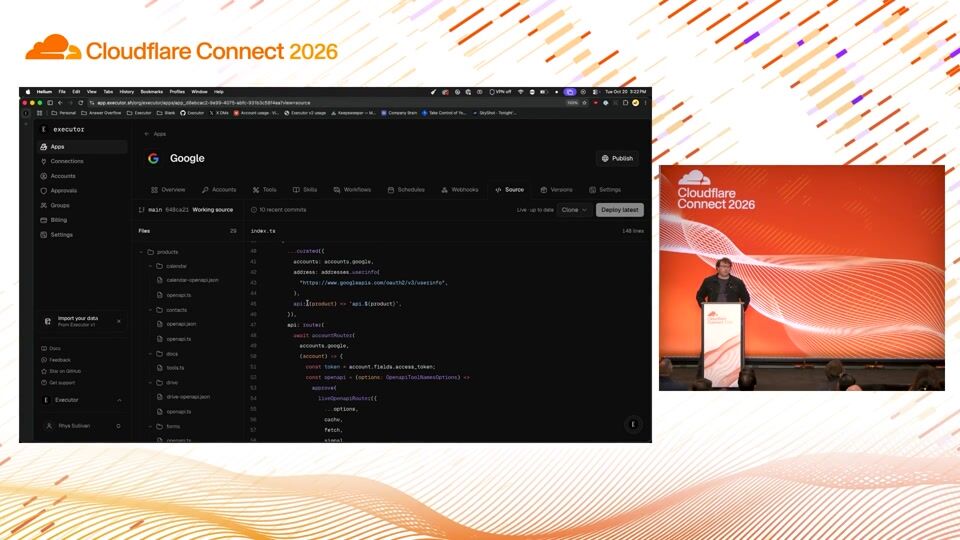
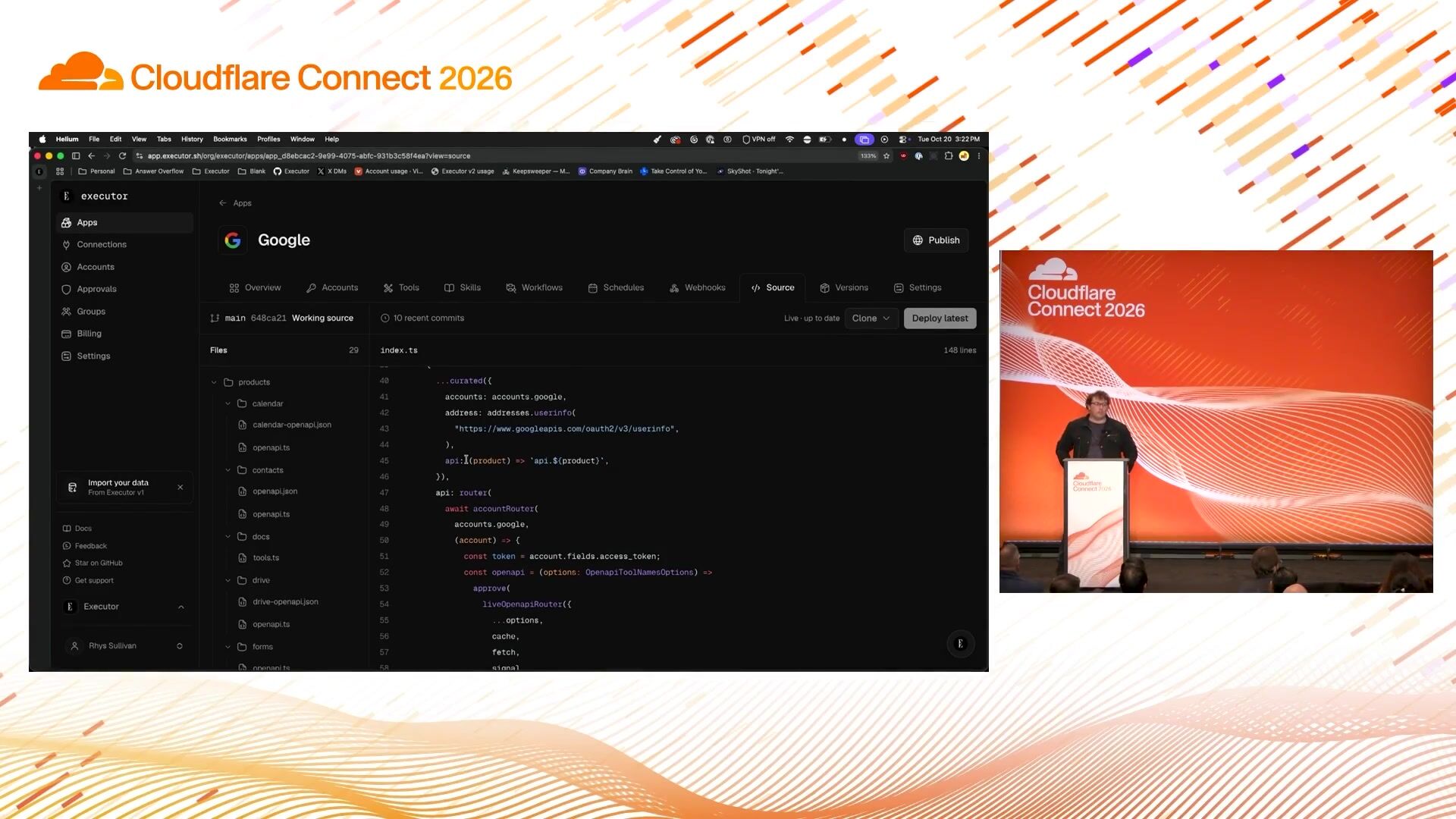
6:20okay so I've set this prompt we'll see what it returns because I'm telling it to leave out the personal info from my emails but it's got my Executor MCP connected and while that runs I'll just quickly show what tools this has. So this is the Google APIs. And I think what's interesting on code mode is you can actually separate it into two parts. You can separate code mode into the actual running of the model. So the model will write call here and it'll write a path to call and how to call it. But the other place you can use code mode is actually if I click on the source tab here, you can see that if you're familiar with Eve, it's very similar. syntax where you use javascript to define a tool and you get a much more flexible implementation so you kind of deploy these little mini apps they have tools skills workflows attached and a bunch of functionality on top of that um and so yeah it's found some emails and then the next thing i kind of want to mention is basically getting a bit more into how this works under the hood and what you can do with it so rather than thinking of mcp as just this like you're reliant on the upstream mcp and that's it.
7:29You can actually think of MCP as like one place to run untrusted code. And so if you have the primitives of storage, WebPack handlers, skills, et cetera, you can basically start from a super minimal MCP and continue to add on on top of that. So one example that I'll do is I'll say, let's see, attach storage to the read email tool so I can take notes on the emails. And what I will do is I'll go ahead and write migration. file it'll start making it so I can take storage it'll extend the tools to have an input output on that and what you've done here is essentially being able to leverage code mode and code execution on top of this to extend the functionality of what a base mcp it provides and so we've got ultra fast on so it'll speed through that implementation but talking about a little bit more basically about how registration and tool would work here so this is like one implementation of it in executor but you can kind of take the concepts anywhere so the model gets basically like a git source to write to and it gets the ability to like define an app an app takes in requirements and then it outputs tools and if we output anything else in this one we also output instructions on how to use it and so like it takes basically the google api spec converts it into a set of tools here and all this just comes from being able to let the model write whatever code it wants to integrate with whatever it needs to.
8:59And so, yeah, it's found the app, it's running commands. And while that also runs, I'll talk about one more benefit of basically being able to let the model write code. And another one of that comes out to one of the biggest pain points that people have with kind of MCP and being connected to things is you know the pain of when you go to call something and you're signed out or you don't know if you've used the authentication correctly right like it's a constant constant hassle of all this and so what's super cool about just letting the model write code is here's part of this framework it's written defined provider in this case it's defining google as a provider this hosts says where the tokens allowed to go and then for authentication um it says here's the oaf and like what scopes are involved and so So you get this like nice mix between trust at the model level, you get this nice mix between trust at the use level where you can kind of see high level, okay, the API token is allowed to go to the right hosts, and then you also get this like ability to have it define a health check where when you connect, you actually know that like, hey, these accounts are working and it can pull the names automatically.
10:10So it's going ahead and running now, and it's updating the read message and read thread. Um, and then you can. actually see under the hood a little bit here some of that code mode execution so yeah it's like found the path around the signature for it it's written TypeScript and this is actually merging the two methods that I mentioned of dynamic worker loaders and open codes code mode interpreter so for all of my like dynamic code mode it goes through the interpreter it's a much more like lightweight form of being able to let the model run uh run TypeScript for toolcalls And then for the highly repeatable ones of extending out MCPs and apps, it's going through the apps framework, which runs on a dynamic worker loader.
10:55And the model, again, writes code in the same way you'd write an XJS app and deploy it to Vasell. And so it's deploying that now. And after that deploys, I'll just have it show that code at a high level so you can kind of get a feel for it.
11:15Cool. And so while that deploys, the last thing I'll mention is like thinking of things rather than like MCPs, skills, web hook handlers, UI as all being separate concepts, you can just think of it as one bundle of code. And so your skills can actually be defined in code as well. And so I'll show you an example of like defining skills in code, which is super cool. And so like here, if I look at the source of this app, you can see, hey, his skills, it's defined as dynamic skills, and rather than like having this super rigid thing that's like, do I load from GitHub and then like have to make a lock file format, you could just say, hey, load from this from GitHub, always at this shah, or in this case, like it's dynamic skill fetching, but it's going from the well-known path, which is super great. And then that becomes an index skill catalog.
12:04And so then back to this, we'll just take a look high level at like how can what code it wrote and yeah so it's just written these tools so let's see it read message took the existing one and now it's returning the notes where it just reads that from SQL and it's just like vibe coding an extension based on untrusted code execution it's now swapping back over to the slides
12:37So this is kind of the second part, which is like tools as a cloud, is kind of what I'm thinking about it is. In the same way that you would deploy a website to Visele, you can deploy code mode and these extensions to MCP servers to your personal cloud. And I'm really excited about this because you get all of this expressibility through untrusted code execution. One example is like, you know, what if you want a customer approval amount? So, any refunds under $20 is fine.
13:10You can just define that as a rule that's like, hey, with approval, if the argument to that function is under $20, let it run. Same thing with like, if you want to ping your phone for a 2FA approval, you can just put in whatever custom code you want. And again, the notes on emails demo, it just extends it with context and the model writing SQL. Along with this, there's like kind of different gateways. use. Another one in the gateway world is the Cloud Flows MSP gateway, where you can move all of your tours, your permission handling outside of the harness and sign into that just one gateway. And then all of the harnesses you use have the same access to tours. And you can also again leverage code mode for that like one unified harness, where it's able to script over all of the tool course you have. And then on the last part about what I mentioned about Bash and CLI is again, they're just super lost.
14:02in terms of, you know, you've got this great information about if APIs are destructive or not. We've, like, had open API specs for, you know, 20 years now, but, like, threw all that out the window in the move to CLIs. But now with Codemode, we've got to get it to come back. And so, yeah, just overall, Codemode lets you have a way more token-efficient way of calling tools rather than bash or raw tools, and then moving your policies outside of the agent and into a gateway. let you rapidly adopt any harness without having to worry about how it's implemented. Great. Thank you so much.
Michael Tremante
Cloudflare
Micah Wylde
Cloudflare
Anthony Maggio, Mark Dembo
Runway · Cloudflare
Be the first to know when registration opens and the agenda goes live.
---
title: "Giving an agent 10,000 tools with Code Mode"
url: "https://www.cloudflare.com/connect/2026/session/giving-an-agent-10-000-tools-with-code-mode"
year: 2026
---

# Giving an agent 10,000 tools with Code Mode

[Watch session](https://www.cloudflare.com/connect/2026/session/giving-an-agent-10-000-tools-with-code-mode)

## Session details

- **Track:** Agent Cloud
- **Topics:** Agentic AI & MCP
- **Solution areas:** Developer Platform

## About this session

How do you give an AI agent access to 10,000 tools without filling its context window? Let it write code. This session explores using Code Mode through Executor to discover tools on demand, combine API calls, and process results in a sandbox. Through a live demo built on Cloudflare, learn the architecture, tradeoffs, and approval controls behind this approach. You’ll leave with practical patterns for connecting agents to large tool catalogs while keeping execution efficient and permissions explicit.

## Speakers

- [Rhys Sullivan](https://www.cloudflare.com/connect/speakers/2512641) — Founder, Executor

## Transcript

[0:03] So we're going to be basically going over code mode, a little bit of the history of it, and then also like beyond code mode, what it really unlocks and then scaling towards A little bit about myself, I'm Rhys, I'm the founder of a company called Executor. It's a personal cloud where you connect all your accounts and then get all your accounts and integrations into, and then you build whatever personal software you want on top Yeah. And cool, let's dive into it. So I think what you'll notice is basically your agent needs to be able to do everything you can. And there's a couple of ways to accomplish that. One is like computer use, but you blow up your token count. One is kind of like raw tool access or bash, but really there's like a better way. And that's code mode. You get a typed capability layer over all of your tools.

[0:50] And I think there's an interesting trend you'll notice once you give people agents and you see them doing and more through them where they basically no longer have the patience to go click through websites anymore. I'm sure many of you have found that have experienced that yourself where you're kind of just like you sign in onto a website now and you're like, give me the API, give me the MCP. I don't want to like click through these, this dashboard anymore, trying to understand your product. And so yeah, the agent that they have needs to be able to do everything. And so people try to do, try to give their agents everything. And you know, one tool, it's fine. At five tools, it's getting, it's a At 100 tours, about half your context window is dedicated to tool names, input output schemas. And really, imagine you got to put yourself in the mind of a model. Imagine you wake up and you immediately have half of your memory stored with tours.

[1:40] And then at 1000 tours, it doesn't even work with the context window. And so you kind of look at how people overcame this. And the first one that really stuck for people was ClaudeCode. And when CloudCo came out, everyone had this kind of like perception that was like, wow, the model only has one tool. It has a bash tool. And we just go, wow, CLIs are the best. You want to give your model as few tools as possible, give the model less tools. If you're on Twitter in February, there are all of these posts and articles about like, we need to design CLIs for agents and everything needs to be a CLI. And I think what was most interesting there is if you kind of like think about the problem from first principles, you haven't actually given. model less tools when you've given it a bash tool, you're just shifting the execution environment. And what I mean by execution environment is it's a place for the agent to find the tools that they're looking for, chain tools together, and then filter the results to preserve their context window.

[2:35] And so when you look at bash, the way that bash kind of works is you get dash dash help, you get progressive disclosure, you get the ability to run the dev server and then put the error into like a cat and figure out what the result was um and then chain those tools together uh but there's like nothing special to bash there um like there's there's many other ways you can express that and one of those was codemode and so it's kind of like what do we what are the problems with bash having me do better bash feels like it works great and i'm actually not going to deny that like there's a lot of times where i myself i'm like just give me a cli it works great um but you're like when you depend on bash, you're kind of like, you think about the functionality of most CLIs, you're introducing a full Unix shell and all of the permission requirements in order to just call an API, which is crazy. Along with that, it's super lossy.

[3:26] So if you consider, you know, the GitHub CLI, you can't tell me exactly what is everything in the GitHub CLI without leveraging agents and parsing to basically go through all of the help menus, figure out that command structure. There's no kind of standard. And what's great about code mode is it solves all of this. So you get, you convert all of your tools to TypeScript, and then because you convert all your tools to TypeScript, you've got an index catalog of tools that you can search over. And then as you're scaling agents, especially the search matters even more. You also know what's returned from the course. If you've ever watched the agent's output, back when we were kind of in the single-threaded agent world, you would notice that this pattern a lot, where they would run a...

[4:12] tool call and then they would run a tool call again after they understand the shape to filter the output and you know you don't really notice this as a problem today because all of the kind of time on time is spent on inference but as models get faster having to wait that 300 milliseconds for a model to do the same call twice especially if it's a destructive tool waste a ton of time

[4:38] and so the last part before jumping into a demo here is kind of like going over a few options of like this code mode and where to run it so you can basically convert all of your mcp tools really any tool type open api graphql whatever you want into typescript and then the model can just write typescript to call that but in order to do that you have to run it you have to run that typescript somewhere there's some interesting options here um so one of the ones there is open code so what open code did for to implement their code mode is they wrote interpreter and so they don't actually run any javascript for their code mode it should be called interpreter mode and what they did is it just interpret the javascript means that they don't have to ship a runner for it another one is dynamic worker loaders they were kind of made for the code mode use case but there's some other more efficient ways you can use them for code mode and so with dynamic worker loaders they're a lot faster than like a quick js but with the trade-off that you get billed on unique billing and then the part is looking at something like a quick JS.

[5:36] So for those of you that don't know, quick JS is this pretty minimal JavaScript runtime, and it's really perfect for the code mode use case as it can run in Wasm is super embeddable. Something like Pi, it leverages quick JS for its code mode. But it has a little bit worse performance and a worse security trade-off.

[5:58] And then kind of like looking at one implementation of code mode, I'm going to walk through a quick demo here of a project. that I built called Executor really it's not too much on the product it's more just looking at like if you give the model an untrusted a place to run untrusted code you can build all this functionality on top of it cool so jumping over to the demo

[6:20] okay so I've set this prompt we'll see what it returns because I'm telling it to leave out the personal info from my emails but it's got my Executor MCP connected and while that runs I'll just quickly show what tools this has. So this is the Google APIs. And I think what's interesting on code mode is you can actually separate it into two parts. You can separate code mode into the actual running of the model. So the model will write call here and it'll write a path to call and how to call it. But the other place you can use code mode is actually if I click on the source tab here, you can see that if you're familiar with Eve, it's very similar. syntax where you use javascript to define a tool and you get a much more flexible implementation so you kind of deploy these little mini apps they have tools skills workflows attached and a bunch of functionality on top of that um and so yeah it's found some emails and then the next thing i kind of want to mention is basically getting a bit more into how this works under the hood and what you can do with it so rather than thinking of mcp as just this like you're reliant on the upstream mcp and that's it.

[7:29] You can actually think of MCP as like one place to run untrusted code. And so if you have the primitives of storage, WebPack handlers, skills, et cetera, you can basically start from a super minimal MCP and continue to add on on top of that. So one example that I'll do is I'll say, let's see, attach storage to the read email tool so I can take notes on the emails. And what I will do is I'll go ahead and write migration. file it'll start making it so I can take storage it'll extend the tools to have an input output on that and what you've done here is essentially being able to leverage code mode and code execution on top of this to extend the functionality of what a base mcp it provides and so we've got ultra fast on so it'll speed through that implementation but talking about a little bit more basically about how registration and tool would work here so this is like one implementation of it in executor but you can kind of take the concepts anywhere so the model gets basically like a git source to write to and it gets the ability to like define an app an app takes in requirements and then it outputs tools and if we output anything else in this one we also output instructions on how to use it and so like it takes basically the google api spec converts it into a set of tools here and all this just comes from being able to let the model write whatever code it wants to integrate with whatever it needs to.

[8:59] And so, yeah, it's found the app, it's running commands. And while that also runs, I'll talk about one more benefit of basically being able to let the model write code. And another one of that comes out to one of the biggest pain points that people have with kind of MCP and being connected to things is you know the pain of when you go to call something and you're signed out or you don't know if you've used the authentication correctly right like it's a constant constant hassle of all this and so what's super cool about just letting the model write code is here's part of this framework it's written defined provider in this case it's defining google as a provider this hosts says where the tokens allowed to go and then for authentication um it says here's the oaf and like what scopes are involved and so So you get this like nice mix between trust at the model level, you get this nice mix between trust at the use level where you can kind of see high level, okay, the API token is allowed to go to the right hosts, and then you also get this like ability to have it define a health check where when you connect, you actually know that like, hey, these accounts are working and it can pull the names automatically.

[10:10] So it's going ahead and running now, and it's updating the read message and read thread. Um, and then you can. actually see under the hood a little bit here some of that code mode execution so yeah it's like found the path around the signature for it it's written TypeScript and this is actually merging the two methods that I mentioned of dynamic worker loaders and open codes code mode interpreter so for all of my like dynamic code mode it goes through the interpreter it's a much more like lightweight form of being able to let the model run uh run TypeScript for toolcalls And then for the highly repeatable ones of extending out MCPs and apps, it's going through the apps framework, which runs on a dynamic worker loader.

[10:55] And the model, again, writes code in the same way you'd write an XJS app and deploy it to Vasell. And so it's deploying that now. And after that deploys, I'll just have it show that code at a high level so you can kind of get a feel for it.

[11:15] Cool. And so while that deploys, the last thing I'll mention is like thinking of things rather than like MCPs, skills, web hook handlers, UI as all being separate concepts, you can just think of it as one bundle of code. And so your skills can actually be defined in code as well. And so I'll show you an example of like defining skills in code, which is super cool. And so like here, if I look at the source of this app, you can see, hey, his skills, it's defined as dynamic skills, and rather than like having this super rigid thing that's like, do I load from GitHub and then like have to make a lock file format, you could just say, hey, load from this from GitHub, always at this shah, or in this case, like it's dynamic skill fetching, but it's going from the well-known path, which is super great. And then that becomes an index skill catalog.

[12:04] And so then back to this, we'll just take a look high level at like how can what code it wrote and yeah so it's just written these tools so let's see it read message took the existing one and now it's returning the notes where it just reads that from SQL and it's just like vibe coding an extension based on untrusted code execution it's now swapping back over to the slides

[12:37] So this is kind of the second part, which is like tools as a cloud, is kind of what I'm thinking about it is. In the same way that you would deploy a website to Visele, you can deploy code mode and these extensions to MCP servers to your personal cloud. And I'm really excited about this because you get all of this expressibility through untrusted code execution. One example is like, you know, what if you want a customer approval amount? So, any refunds under $20 is fine.

[13:10] You can just define that as a rule that's like, hey, with approval, if the argument to that function is under $20, let it run. Same thing with like, if you want to ping your phone for a 2FA approval, you can just put in whatever custom code you want. And again, the notes on emails demo, it just extends it with context and the model writing SQL. Along with this, there's like kind of different gateways. use. Another one in the gateway world is the Cloud Flows MSP gateway, where you can move all of your tours, your permission handling outside of the harness and sign into that just one gateway. And then all of the harnesses you use have the same access to tours. And you can also again leverage code mode for that like one unified harness, where it's able to script over all of the tool course you have. And then on the last part about what I mentioned about Bash and CLI is again, they're just super lost.

[14:02] in terms of, you know, you've got this great information about if APIs are destructive or not. We've, like, had open API specs for, you know, 20 years now, but, like, threw all that out the window in the move to CLIs. But now with Codemode, we've got to get it to come back. And so, yeah, just overall, Codemode lets you have a way more token-efficient way of calling tools rather than bash or raw tools, and then moving your policies outside of the agent and into a gateway. let you rapidly adopt any harness without having to worry about how it's implemented. Great. Thank you so much.

## Related sessions

- [Building an open agentic Internet: Discoverable, callable, and payable](https://www.cloudflare.com/connect/2026/session/building-an-open-agentic-internet-discoverable-callable-and-payable)
- [Turning data questions into data infra with Cloudflare Basin](https://www.cloudflare.com/connect/2026/session/turning-data-questions-into-data-infra-with-cloudflare-basin)
- [Generative media’s breakthrough moment: Insights from Runway](https://www.cloudflare.com/connect/2026/session/generative-medias-breakthrough-moment-insights-from-runway)

## More from Connect

- [All sessions](https://www.cloudflare.com/connect/)
- [Get notified for Connect 2027](https://www.cloudflare.com/connect#2027)


