Agent Cloud
12 mistakes we made building an agent platform for 100,000 employees


Kevin Ng, Justin Watts
TELUS
AI-generated code needs a place to run. This session follows a request through Nimbus, Figma’s sandbox platform, showing how Cloudflare Workers, Cloudflare Durable Objects, and Cloudflare Containers connect an AI coding workflow to a live browser preview. Developers will see a working demo and learn three practical patterns: allocating isolated compute, routing interactive preview traffic, and using warm sandboxes to reduce startup waits.
0:02Hi, I'm Pratik Agarwal. I am one of the founding engineers on Figma Sandbox platform that we dearly call Nimbus. Today, I'm going to talk about how Figma runs AI -generated code on Cloudflare. Before I talk about our request parts and code and sandboxes, just quickly introducing Figma Make because I'm going to be using Make as a reference throughout this talk. Figma Make is a platform that allows you to create a new platform that allows you to create a new platform. users to go from an idea to production. So you have an idea, you describe the context, you take it to figment design, you polish it, you bring it back to make and you can create a fully functional application from it. So that's one of our numerous suits of AI products that we have right now that I'm going to be keep referring so that we can you know relate to what's going on. Quick show of hands, has anyone here like you know written code or had wrote code through and then waited for a live preview to come back on the browser.
1:01Well, that's 30-ish percent. Looks like we have a lot of infra people. I'm also in infra, so I don't do a lot of this, but thankfully with agents, I am doing this a lot, and I'm able to do a lot of end-to-end and full stack development. But this has like three milestones, essentially. You write code or the agent write code, it sits in the file system. That's like the first part. There's a process that runs on top of those files, maybe a binary. or like a development server that's like the second part and the third part is connecting this process back to the browser the browser needs to read what's going on inside your sandbox and then render a ui on top of it uh nimbus helps connect with the help of cloudflare of course helps connect all of these three different milestones uh to accomplish a user request
1:48before talking about gold it's i want to introduce this term called namespace. If you are familiar with Kubernetes, and if you've heard of declarative patterns, it's very similar to that, where Figma has a lot of product teams, and all of these product teams need to run their own AI workloads. We cannot have each of these teams worry about the infrastructure that powers these AI workloads, because then they're going to spend half the time worrying about that. They want to solve business problems. They want to solve... user problems. So you have to establish some kind of a contract between the product teams and the platform. This contract is what we call a namespace. It's a pretty dumb JSON file where product teams sort of describe their intent.
2:36They specify what, let's say, the container image location is that will run inside the sandbox or the container. I'm going to be using the term container, sandbox, isolated environment. a bit interchangeably i think you know all these three things have been used across different companies in different you know ways but i'm gonna use them interchangeably um so the namespace is the contract between the platform team and the product teams uh where they define like the runtime image that that's going to run inside the container the resources they might need like number of vcpus the memory they allocate um the capacity by capacity we mean by the number of concurrent containers or sandboxes that might run it at any given point, the ports, the services that the browser needs to talk to, environment variables if any, and most importantly network policies to control any things that the agent might do but you don't want it to do.
3:27Falling up on that, the first pattern I want to talk about here is allocating isolated compute. Now there's too many things on those three words so let's start with isolated compute. Why is isolated compute important? As I said, if you give an agent a task, it will try its best to accomplish it in any manner possible, be it just squeezing out all of your CPU, hogging all your memory resources, talking to an endpoint and uploading public data or private data, it should not. So that's why we need isolation because we don't want your user workloads to impact any other user workloads and vice versa. So that's the isolated compute bit. Now, how do we allocate it at Figma. We use a term called a routing key. A routing key associates a single user session with a logical entity like a Figma makefile.
4:20So that let's say you prompt something today, you do your work, you come back a day later, the routing key is repeatable. We know how to associate this routing key with this particular makefile and what container or sandbox we should go ahead and provision.
4:40We have this durable storage machine, or durable state machine, I'm sorry, that we have within Nimbus that takes care of this allocation. So as a user, if you make a request on Figma Make, we first mark it as pending, we do some checks, and then we change the status to either provision or fail. Fail is hopefully very rare, it is very rare. We need this state machine inside Nimbus because, as a user, you don't want concurrent requests. a user's concurrent requests to end up provisioning different sandboxes. So as a user, you go into Figma Make, you make a prompt. You want only one sandbox to be always processing it. Because if you have different sandboxes, you run into a bunch of split-brain situations, which means that there are two sort of authorities for this particular workload, which is like a bad situation.
5:28It can lead to data loss, data corruption. So modeling your provisioning request or allocation request as a state machine is very helpful. On top of that, what that turns out to is the provision request goes to a Cloudflare worker. The Cloudflare worker associates that request with a durable object handler and then we start the container through this particular durable object handler. A durable object is important here to store the state of the configuration of the sandbox. Like we described in the namespace contract, there are certain things in the namespace contract that needs to be persisted even if a Cloudflare container like slept and woke up or got restarted for any reason we do not want to lose that state for example a security control that you want to talk to only these number of endpoints we do not want to lose that information even if containers restart so that's why i think that's the part where we use durable objects along with Cloudflare containers and workers do the routing to these durable objects okay now we spoke about the contract we spoke about some parts about path as to what happens when you open a Figma make and then prompt to it what's happening inside the container inside the container we have a bunch of workloads so product teams are the ones that define these workloads that write code to make sure that processes start up and then the browser can talk to it we as a platform team built a demon that we call sandbox g that supervises these
7:01Sandbox Z is the daemon that runs as a part of the base image of a container or a sandbox. It does reverse proxy, it authorizes requests, it does health check when the browser requests for the health of a sandbox or when the platform requests for the health of a sandbox. So Sandbox Z is basically the process supervisor for all the workload processes that are running inside the sandbox. When I say health, a quick note here might seem nitpick, but the health of a sandbox is not necessarily... to mean the health of every workload running inside the process. So going back to Kubernetes world, if you have heard of liveliness or readiness, you can borrow your concepts from there to make sure that all the workloads that's running inside the sandbox have these notion of liveness and readiness that you want to listen to from your daemon and make sure you're relaying that information back to the platform so that it can take actions as necessary.
7:53Okay, so we spoke on the contract, we spoke about provisioning or allocating a sandbox, we spoke about allocating isolated compute. Now we have the compute. We spoke about a bunch of processes that's running inside the compute. These processes also include your agent loop, like Cloud Code or Codex or whatever harness you want to use. Now once you have this code ready inside the sandbox, you need to connect it back to the browser. The browser, let's say again, in Figma Make, when you prompt something, you see a preview. We show that preview in the... iFrame on the browser, so the iFrame should be able to connect to this particular sandbox. That's what we do through a preview URL. So once we allocate a sandbox, the URL of the sandbox, which is like a public identity, is available to the browser.
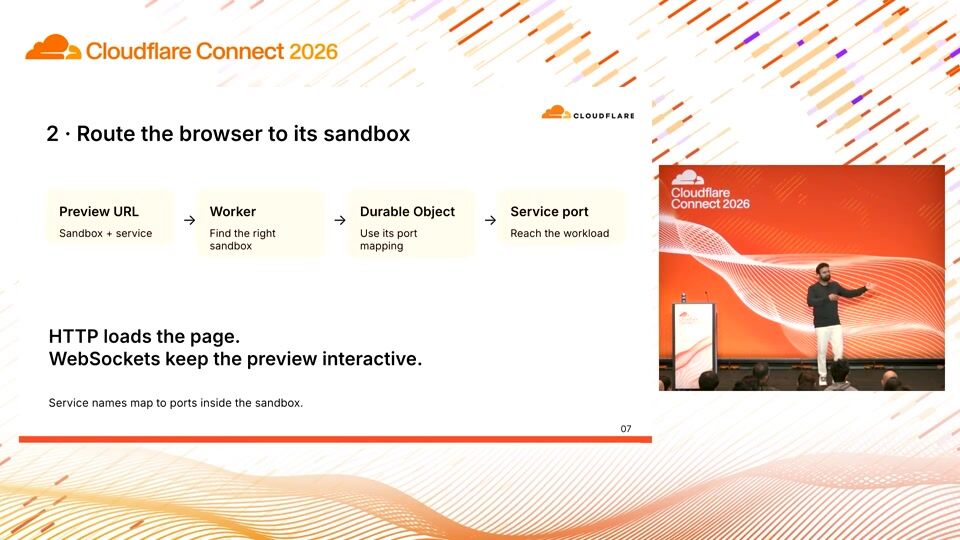
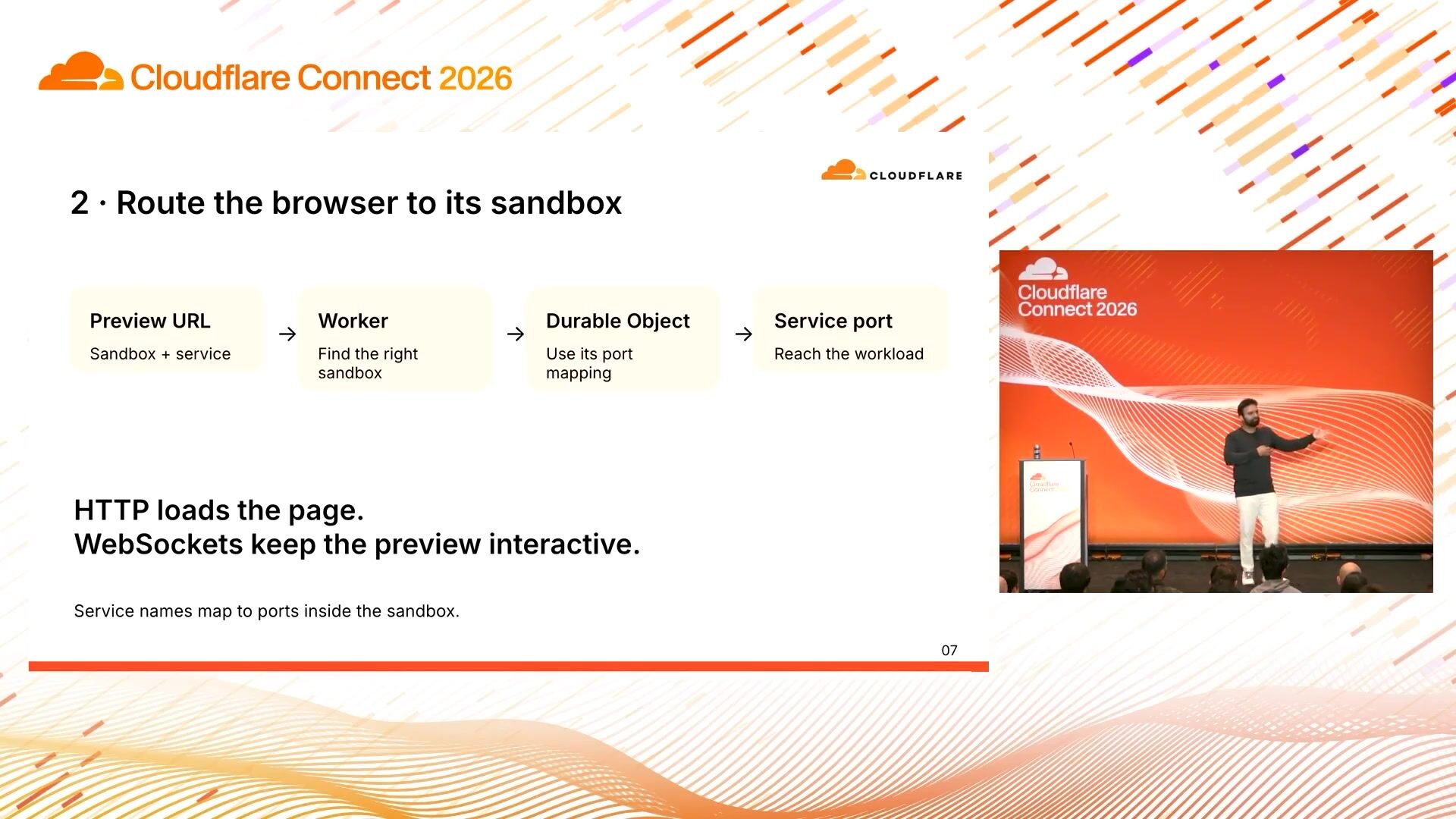
8:40That's how the browser knows how to establish, let's say, a long-lived web socket connection with this particular sandbox. So this preview URL has the container or sandbox identity. encoded in it, along with the service name. The browser knows this URL. Once it calls this endpoint, it goes to a Cloudflare worker. The Cloudflare worker can decode this public URL and figure out the exact container identity, associate the DurableObject handle back to it, and then call the sandbox at that particular port that the browser wants it to talk to. That's why DurableObjects are important because you need to persist all the state, even if... users are coming back, let's say, a day later to resume their work.
9:29A little bit of code. I don't want to go super deep into this, but I think this is the part of the code which ensures that both HTTP and WebSockets both work with this preview URL or the public URL. Page load is not the only part. Once you open Figma Make, let's say, for an existing application, you will be able to see the preview. of what you did before, but you also want to edit. You also want to iterate. You also want to build on top of it, and you want to keep seeing your changes as you build on top of it. So there are two parts. One is the HTTP path for the page load, and one is the real-time interaction you're having with your sandbox, which you don't know is a sandbox, but you're having a real-time interaction with the sandbox, and it's being rendered back to the browser on the iFrame through that one single public URL.
10:17Now I'm going to quickly show a makefile, and this is a prototype thing we use all the time. I'm going to refresh this page so that all the junk here goes away.
10:31I have a filter for the subscribe endpoint, which is the WebSocket connection. The Figma make browser is, the browser here is establishing with the sandbox eventually. There is a control plane in the middle, but eventually there is a control plane in the middle. it is talking to that sandbox inside this subscribe you can see the first call is for a workspace ensure so this makes sure that the workspace is created it gets an acknowledgement you can see the cloudfire sandbox id here you can see the application url and other metadata we have a warm true flag that i'm going to talk about soon as a part of my next slide now so these two calls here make sure that your sandbox is now ready and up and running what next next what next is the thing that you prompted we need to create a workspace for it um or workload for it sorry so this is the workload we register a bunch of different watches for your particular workload so the moment you prompt in the ready sandbox we create a workload for your particular context that you added now this workload registers this this the browser registers a bunch of watch with the sandbox like we call it watchers watches it's basically something that is like always you know talking back talking back and forth between the browser and the sandbox so we call it like a watcher there are a bunch of watches here you can see this preview watcher is the preview url i was talking about so you can see the status here
12:02is stopped the workspace status is bootstrapping somewhere down here it says the status is starting And finally, we send a lot of messages.
12:16We have the status as ready. So now once the status is ready of a particular workload, you will see that the URL here, the public URL is provided as part of that last message or that WebSocket message. And this is the URL the browser knows now it needs to talk to to connect the iframe back to the sandbox so that it can render whatever code you want to see. on the UI. Yeah, super small demo. We can go back to the slides.
12:48All right.
12:52Now, okay, we spoke a lot about, so we started with the contract. We spoke about why isolation is important. We had an isolated environment for our agents to run. We routed to that environment. We connected back the sandbox to the browser. the two milestones are done now this is the provisioning part like how do you manage and allocate all these sandboxes figma today runs tens of thousands of sandboxes across 15 different or 20 different ai workloads um that's why we needed this you know common shared platform because you don't want all these teams to like go ahead and you know start hammering cloud fair any the provider out there um so nimbus is when we when we build nimbus the first couple of for the first cases, we directly provisioned a sandbox when a user request came in. Over time, we found that to be unstable. Latencies were not super deterministic.
13:39It could take between 5 seconds to 12 seconds at P99. Reliability was a bit of an issue. So we decided that we're going to just keep a stock of sandboxes all the time, which we called a warm pool. So for every contract, initially I mentioned for every namespace, we have a warm pool. pool where we stock a bunch of sandboxes ahead of time so your container bootstrap time is gone your health check time is gone everything the application needs to do we are doing ahead of time and once a request comes in we just pluck from this warm pool or pick from this warm pool and associate that user-specific metadata to this particular container which is like less than a second so you you bring down your container bootstrap time from like 10 seconds to less than one second because you have just like the background stock of sandboxes is always available.
14:34Now, you have a stock of sandboxes, but they should be usable. They should be not useless, right? So how do you know that? So we also have this background lifestyle reconciler which is constantly health-checking all these sandboxes all the time, be it in the warm pool or be it in an actual user path. And if it deems unhealthy, it can just kill it and recreate new ones. So the third pattern here is, The warm pool is really nice if you care about latencies, if you want to reduce provisioning latencies, you can have this pre-provisioned stock of sandboxes. One more clever thing we do is if you go to Figma make and if you stop typing something, you will see that the sandbox is already provisioned for you. So you don't even have to wait for your user to actually submit a prompt and then start the process.
15:19If a user starts typing, you get sort of a signal that they want to do something eventually.
15:26So stocking sandboxes is all good, but it also costs money. Like I can stock in like a million sandboxes, Cloudflare will be happy to do that for me, but then I have to pay for all of that, right? So you need to come up with like the right balance of availability and cost. You having all these sandboxes help with both availability, because let's say Cloudflare's control plane has a blip. You have these stock of sandboxes you can rely upon that you can just pick up and then give it to your user. And it's also fast. So you are... have this balance between like cost and availability and latency um the way we you know balance that cost is we measure the demand to the warm pool how much how much demand is coming to this particular warm pool for this particular namespace and based on the demand we calculate what we call it a drain rate but based on this demand or drain rate we calculate how many sandboxes should we always keep we keep it always between the minimum and the maximum that the product teams have told us to also care about cost.
16:22And then we add a CFD factor and a time threshold in a calculation for how many sandboxes should always be there. So it's a simple autoscaling algorithm, but it's a very simple equation currently in this algorithm. Interestingly, I did prototype seven or eight different autoscaling algorithms by just having my agent emit a metric for them in shadow mode by reading a bunch of papers. But this turned out to be as simple as the most efficient. So we just went along with this. No amount of like. other autoscaling research was needed here.
16:55All right, so taking a step back, we spoke about three patterns. The first one we just spoke about was have this background warm pool stock of sandboxes always available that helps with availability and latency of user requests when they're trying to provision something. When a user actually requests something, just bind your logical ID to the sandbox and keep them isolated. And then finally, you have to connect the browser back to the sandbox or the sandbox back to the browser that we do through the preview URLs or the Cloudflare URLs with the help of Cloudflare workers and durable objects.
17:33Yeah, so these are just the three patterns, again, adding it like small bullet points.
17:40Cloudflare was really helpful for us in this process. I have like two or three engineers sitting here that I messaged them maybe thrice a week. here at this point. They were really helpful, great customer support. I think one of the things that infrastructure vendors should always remember is customer support and customer obsession really goes a long way. I feel Cloudflare did a great job on that. Native feature support, so having programmatic access in front of the sandbox really helped us. So for example, we can inspect every packet that comes through the Cloudflare worker that helps us, let's say separate. request versus a get request. You can be more liberal with your reads versus your writes. Egress control, like just giving them a set of endpoints that the sandbox can talk to without building a bunch of stuff on our end.
18:26Custom domain support, like as a customer, if you're using Figma, you don't want to see random URLs. You want to see a trusted URL. So I think these kind of features were just natively provided out of the box from Cloudflare. And that was really great.
18:39Yeah, that's it for my session. Your feedback is really important. I would love to hear how you've been. this session if you learned anything from it. I am Prateek again and thanks for your time.
Kevin Ng, Justin Watts
TELUS
Matan Lachmish
monday.com
Ahmad Awais
Command Code
Be the first to know when registration opens and the agenda goes live.
---
title: "How Figma runs AI-generated code on Cloudflare"
url: "https://www.cloudflare.com/connect/2026/session/how-figma-runs-ai-generated-code-on-cloudflare"
year: 2026
---

# How Figma runs AI-generated code on Cloudflare

[Watch session](https://www.cloudflare.com/connect/2026/session/how-figma-runs-ai-generated-code-on-cloudflare)

## Session details

- **Track:** Agent Cloud
- **Topics:** AI inference & workloads, App modernization
- **Solution areas:** Developer Platform

## About this session

AI-generated code needs a place to run. This session follows a request through Nimbus, Figma’s sandbox platform, showing how Cloudflare Workers, Cloudflare Durable Objects, and Cloudflare Containers connect an AI coding workflow to a live browser preview. Developers will see a working demo and learn three practical patterns: allocating isolated compute, routing interactive preview traffic, and using warm sandboxes to reduce startup waits.

## Speakers

- [Pratik Agarwal](https://www.cloudflare.com/connect/speakers/2528013) — Software Engineer, Figma

## Transcript

[0:02] Hi, I'm Pratik Agarwal. I am one of the founding engineers on Figma Sandbox platform that we dearly call Nimbus. Today, I'm going to talk about how Figma runs AI -generated code on Cloudflare. Before I talk about our request parts and code and sandboxes, just quickly introducing Figma Make because I'm going to be using Make as a reference throughout this talk. Figma Make is a platform that allows you to create a new platform that allows you to create a new platform. users to go from an idea to production. So you have an idea, you describe the context, you take it to figment design, you polish it, you bring it back to make and you can create a fully functional application from it. So that's one of our numerous suits of AI products that we have right now that I'm going to be keep referring so that we can you know relate to what's going on. Quick show of hands, has anyone here like you know written code or had wrote code through and then waited for a live preview to come back on the browser.

[1:01] Well, that's 30-ish percent. Looks like we have a lot of infra people. I'm also in infra, so I don't do a lot of this, but thankfully with agents, I am doing this a lot, and I'm able to do a lot of end-to-end and full stack development. But this has like three milestones, essentially. You write code or the agent write code, it sits in the file system. That's like the first part. There's a process that runs on top of those files, maybe a binary. or like a development server that's like the second part and the third part is connecting this process back to the browser the browser needs to read what's going on inside your sandbox and then render a ui on top of it uh nimbus helps connect with the help of cloudflare of course helps connect all of these three different milestones uh to accomplish a user request

[1:48] before talking about gold it's i want to introduce this term called namespace. If you are familiar with Kubernetes, and if you've heard of declarative patterns, it's very similar to that, where Figma has a lot of product teams, and all of these product teams need to run their own AI workloads. We cannot have each of these teams worry about the infrastructure that powers these AI workloads, because then they're going to spend half the time worrying about that. They want to solve business problems. They want to solve... user problems. So you have to establish some kind of a contract between the product teams and the platform. This contract is what we call a namespace. It's a pretty dumb JSON file where product teams sort of describe their intent.

[2:36] They specify what, let's say, the container image location is that will run inside the sandbox or the container. I'm going to be using the term container, sandbox, isolated environment. a bit interchangeably i think you know all these three things have been used across different companies in different you know ways but i'm gonna use them interchangeably um so the namespace is the contract between the platform team and the product teams uh where they define like the runtime image that that's going to run inside the container the resources they might need like number of vcpus the memory they allocate um the capacity by capacity we mean by the number of concurrent containers or sandboxes that might run it at any given point, the ports, the services that the browser needs to talk to, environment variables if any, and most importantly network policies to control any things that the agent might do but you don't want it to do.

[3:27] Falling up on that, the first pattern I want to talk about here is allocating isolated compute. Now there's too many things on those three words so let's start with isolated compute. Why is isolated compute important? As I said, if you give an agent a task, it will try its best to accomplish it in any manner possible, be it just squeezing out all of your CPU, hogging all your memory resources, talking to an endpoint and uploading public data or private data, it should not. So that's why we need isolation because we don't want your user workloads to impact any other user workloads and vice versa. So that's the isolated compute bit. Now, how do we allocate it at Figma. We use a term called a routing key. A routing key associates a single user session with a logical entity like a Figma makefile.

[4:20] So that let's say you prompt something today, you do your work, you come back a day later, the routing key is repeatable. We know how to associate this routing key with this particular makefile and what container or sandbox we should go ahead and provision.

[4:40] We have this durable storage machine, or durable state machine, I'm sorry, that we have within Nimbus that takes care of this allocation. So as a user, if you make a request on Figma Make, we first mark it as pending, we do some checks, and then we change the status to either provision or fail. Fail is hopefully very rare, it is very rare. We need this state machine inside Nimbus because, as a user, you don't want concurrent requests. a user's concurrent requests to end up provisioning different sandboxes. So as a user, you go into Figma Make, you make a prompt. You want only one sandbox to be always processing it. Because if you have different sandboxes, you run into a bunch of split-brain situations, which means that there are two sort of authorities for this particular workload, which is like a bad situation.

[5:28] It can lead to data loss, data corruption. So modeling your provisioning request or allocation request as a state machine is very helpful. On top of that, what that turns out to is the provision request goes to a Cloudflare worker. The Cloudflare worker associates that request with a durable object handler and then we start the container through this particular durable object handler. A durable object is important here to store the state of the configuration of the sandbox. Like we described in the namespace contract, there are certain things in the namespace contract that needs to be persisted even if a Cloudflare container like slept and woke up or got restarted for any reason we do not want to lose that state for example a security control that you want to talk to only these number of endpoints we do not want to lose that information even if containers restart so that's why i think that's the part where we use durable objects along with Cloudflare containers and workers do the routing to these durable objects okay now we spoke about the contract we spoke about some parts about path as to what happens when you open a Figma make and then prompt to it what's happening inside the container inside the container we have a bunch of workloads so product teams are the ones that define these workloads that write code to make sure that processes start up and then the browser can talk to it we as a platform team built a demon that we call sandbox g that supervises these

[7:01] Sandbox Z is the daemon that runs as a part of the base image of a container or a sandbox. It does reverse proxy, it authorizes requests, it does health check when the browser requests for the health of a sandbox or when the platform requests for the health of a sandbox. So Sandbox Z is basically the process supervisor for all the workload processes that are running inside the sandbox. When I say health, a quick note here might seem nitpick, but the health of a sandbox is not necessarily... to mean the health of every workload running inside the process. So going back to Kubernetes world, if you have heard of liveliness or readiness, you can borrow your concepts from there to make sure that all the workloads that's running inside the sandbox have these notion of liveness and readiness that you want to listen to from your daemon and make sure you're relaying that information back to the platform so that it can take actions as necessary.

[7:53] Okay, so we spoke on the contract, we spoke about provisioning or allocating a sandbox, we spoke about allocating isolated compute. Now we have the compute. We spoke about a bunch of processes that's running inside the compute. These processes also include your agent loop, like Cloud Code or Codex or whatever harness you want to use. Now once you have this code ready inside the sandbox, you need to connect it back to the browser. The browser, let's say again, in Figma Make, when you prompt something, you see a preview. We show that preview in the... iFrame on the browser, so the iFrame should be able to connect to this particular sandbox. That's what we do through a preview URL. So once we allocate a sandbox, the URL of the sandbox, which is like a public identity, is available to the browser.

[8:40] That's how the browser knows how to establish, let's say, a long-lived web socket connection with this particular sandbox. So this preview URL has the container or sandbox identity. encoded in it, along with the service name. The browser knows this URL. Once it calls this endpoint, it goes to a Cloudflare worker. The Cloudflare worker can decode this public URL and figure out the exact container identity, associate the DurableObject handle back to it, and then call the sandbox at that particular port that the browser wants it to talk to. That's why DurableObjects are important because you need to persist all the state, even if... users are coming back, let's say, a day later to resume their work.

[9:29] A little bit of code. I don't want to go super deep into this, but I think this is the part of the code which ensures that both HTTP and WebSockets both work with this preview URL or the public URL. Page load is not the only part. Once you open Figma Make, let's say, for an existing application, you will be able to see the preview. of what you did before, but you also want to edit. You also want to iterate. You also want to build on top of it, and you want to keep seeing your changes as you build on top of it. So there are two parts. One is the HTTP path for the page load, and one is the real-time interaction you're having with your sandbox, which you don't know is a sandbox, but you're having a real-time interaction with the sandbox, and it's being rendered back to the browser on the iFrame through that one single public URL.

[10:17] Now I'm going to quickly show a makefile, and this is a prototype thing we use all the time. I'm going to refresh this page so that all the junk here goes away.

[10:31] I have a filter for the subscribe endpoint, which is the WebSocket connection. The Figma make browser is, the browser here is establishing with the sandbox eventually. There is a control plane in the middle, but eventually there is a control plane in the middle. it is talking to that sandbox inside this subscribe you can see the first call is for a workspace ensure so this makes sure that the workspace is created it gets an acknowledgement you can see the cloudfire sandbox id here you can see the application url and other metadata we have a warm true flag that i'm going to talk about soon as a part of my next slide now so these two calls here make sure that your sandbox is now ready and up and running what next next what next is the thing that you prompted we need to create a workspace for it um or workload for it sorry so this is the workload we register a bunch of different watches for your particular workload so the moment you prompt in the ready sandbox we create a workload for your particular context that you added now this workload registers this this the browser registers a bunch of watch with the sandbox like we call it watchers watches it's basically something that is like always you know talking back talking back and forth between the browser and the sandbox so we call it like a watcher there are a bunch of watches here you can see this preview watcher is the preview url i was talking about so you can see the status here

[12:02] is stopped the workspace status is bootstrapping somewhere down here it says the status is starting And finally, we send a lot of messages.

[12:16] We have the status as ready. So now once the status is ready of a particular workload, you will see that the URL here, the public URL is provided as part of that last message or that WebSocket message. And this is the URL the browser knows now it needs to talk to to connect the iframe back to the sandbox so that it can render whatever code you want to see. on the UI. Yeah, super small demo. We can go back to the slides.

[12:48] All right.

[12:52] Now, okay, we spoke a lot about, so we started with the contract. We spoke about why isolation is important. We had an isolated environment for our agents to run. We routed to that environment. We connected back the sandbox to the browser. the two milestones are done now this is the provisioning part like how do you manage and allocate all these sandboxes figma today runs tens of thousands of sandboxes across 15 different or 20 different ai workloads um that's why we needed this you know common shared platform because you don't want all these teams to like go ahead and you know start hammering cloud fair any the provider out there um so nimbus is when we when we build nimbus the first couple of for the first cases, we directly provisioned a sandbox when a user request came in. Over time, we found that to be unstable. Latencies were not super deterministic.

[13:39] It could take between 5 seconds to 12 seconds at P99. Reliability was a bit of an issue. So we decided that we're going to just keep a stock of sandboxes all the time, which we called a warm pool. So for every contract, initially I mentioned for every namespace, we have a warm pool. pool where we stock a bunch of sandboxes ahead of time so your container bootstrap time is gone your health check time is gone everything the application needs to do we are doing ahead of time and once a request comes in we just pluck from this warm pool or pick from this warm pool and associate that user-specific metadata to this particular container which is like less than a second so you you bring down your container bootstrap time from like 10 seconds to less than one second because you have just like the background stock of sandboxes is always available.

[14:34] Now, you have a stock of sandboxes, but they should be usable. They should be not useless, right? So how do you know that? So we also have this background lifestyle reconciler which is constantly health-checking all these sandboxes all the time, be it in the warm pool or be it in an actual user path. And if it deems unhealthy, it can just kill it and recreate new ones. So the third pattern here is, The warm pool is really nice if you care about latencies, if you want to reduce provisioning latencies, you can have this pre-provisioned stock of sandboxes. One more clever thing we do is if you go to Figma make and if you stop typing something, you will see that the sandbox is already provisioned for you. So you don't even have to wait for your user to actually submit a prompt and then start the process.

[15:19] If a user starts typing, you get sort of a signal that they want to do something eventually.

[15:26] So stocking sandboxes is all good, but it also costs money. Like I can stock in like a million sandboxes, Cloudflare will be happy to do that for me, but then I have to pay for all of that, right? So you need to come up with like the right balance of availability and cost. You having all these sandboxes help with both availability, because let's say Cloudflare's control plane has a blip. You have these stock of sandboxes you can rely upon that you can just pick up and then give it to your user. And it's also fast. So you are... have this balance between like cost and availability and latency um the way we you know balance that cost is we measure the demand to the warm pool how much how much demand is coming to this particular warm pool for this particular namespace and based on the demand we calculate what we call it a drain rate but based on this demand or drain rate we calculate how many sandboxes should we always keep we keep it always between the minimum and the maximum that the product teams have told us to also care about cost.

[16:22] And then we add a CFD factor and a time threshold in a calculation for how many sandboxes should always be there. So it's a simple autoscaling algorithm, but it's a very simple equation currently in this algorithm. Interestingly, I did prototype seven or eight different autoscaling algorithms by just having my agent emit a metric for them in shadow mode by reading a bunch of papers. But this turned out to be as simple as the most efficient. So we just went along with this. No amount of like. other autoscaling research was needed here.

[16:55] All right, so taking a step back, we spoke about three patterns. The first one we just spoke about was have this background warm pool stock of sandboxes always available that helps with availability and latency of user requests when they're trying to provision something. When a user actually requests something, just bind your logical ID to the sandbox and keep them isolated. And then finally, you have to connect the browser back to the sandbox or the sandbox back to the browser that we do through the preview URLs or the Cloudflare URLs with the help of Cloudflare workers and durable objects.

[17:33] Yeah, so these are just the three patterns, again, adding it like small bullet points.

[17:40] Cloudflare was really helpful for us in this process. I have like two or three engineers sitting here that I messaged them maybe thrice a week. here at this point. They were really helpful, great customer support. I think one of the things that infrastructure vendors should always remember is customer support and customer obsession really goes a long way. I feel Cloudflare did a great job on that. Native feature support, so having programmatic access in front of the sandbox really helped us. So for example, we can inspect every packet that comes through the Cloudflare worker that helps us, let's say separate. request versus a get request. You can be more liberal with your reads versus your writes. Egress control, like just giving them a set of endpoints that the sandbox can talk to without building a bunch of stuff on our end.

[18:26] Custom domain support, like as a customer, if you're using Figma, you don't want to see random URLs. You want to see a trusted URL. So I think these kind of features were just natively provided out of the box from Cloudflare. And that was really great.

[18:39] Yeah, that's it for my session. Your feedback is really important. I would love to hear how you've been. this session if you learned anything from it. I am Prateek again and thanks for your time.

## Related sessions

- [12 mistakes we made building an agent platform for 100,000 employees](https://www.cloudflare.com/connect/2026/session/12-mistakes-we-made-building-an-agent-platform-for-100-000-employees)
- [SocialKit: AI social toolset built on Cloudflare](https://www.cloudflare.com/connect/2026/session/socialkit-ai-social-toolset-built-on-cloudflare)
- [How we built Command Code, the most used open-model harness, at 950T tokens](https://www.cloudflare.com/connect/2026/session/how-we-built-command-code-the-most-used-open-model-harness-at-950t-tokens)

## More from Connect

- [All sessions](https://www.cloudflare.com/connect/)
- [Get notified for Connect 2027](https://www.cloudflare.com/connect#2027)

